Introducing QRPickle, a hand-held companion for the field
#esp32 #esp32-cyd #field-ops #qrp #aprs #pota #lvgl #hamclock #qrpickle
Reading time: 4 minutes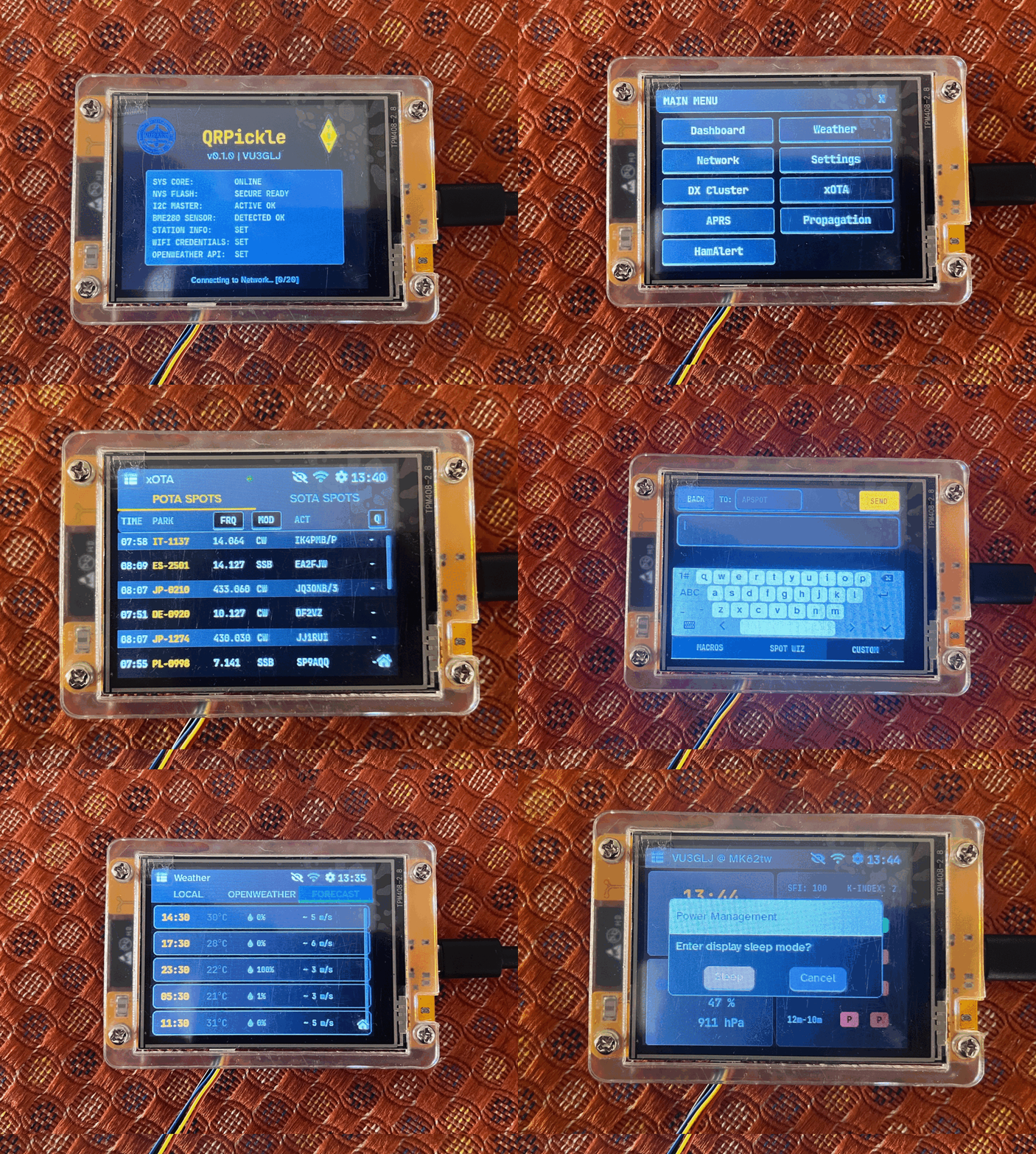
Figure 1: QRPickle Splash Screen
This is a quick post introducing QRPickle, an ESP32-CYD hand-held for those who need a companion device in the field. I’ve been thinking about an easy way I can spot myself, look at APRS, get some band info, etc. in the field without having to resorting to the phone1.
TLDR; version:
- ESP32-CYD with BME280 for local Wx
- Open-source firmware
- Download firmware and manual
- Head over to the web-based flasher at espressif or to an alternate and flash the firmware
Background
A few HAMs (VU3GWN, VU25RK and a few others) at BARC were talking about an ESP32 powered HAM Clock based on https://www.hackster.io/cburns2/ham-clock-cyd-ad1a45 and by SP3KON’s work https://github.com/SP3KON/ESP32-HAM-CLOCK. A group buy/build occurred fairly quickly and VU3GWN put together some very good changes for English localisation and usage at https://github.com/coffeedev/BARC-HAM-CLOCK.
A few challenges in how the screens presented information, and the kinds of information that were useful for me is what got me started to tinker with this project. I needed something that had better, readable fonts, high contrast themes for the field (night and day), pre-configured profiles that I can switch between when I am in the field, self spotting when in the field. While I do love the idea of HAM Clocks2, given that I don’t operate from home and self-hosting a clock with I will then have to “connect” to while in the field seemed tedious.
Requirements
My basic requirements for the HAM Clock were:
- Small and hand-held
- QRP and battery powered
- Band conditions and propagation
- Self-spotting
- DX Spots
- POTA/SOTA lookups
- APRS (I discovered APRS through this project)
- OTA for firmware
- Wx conditions
- Field friendly themes
- Profiles to switch hassle free in the field
- Web UI for advanced settings
Developing the firmware
Arduino development is a nightmare! The versioning of libraries, the existing hardware clones, the way Arduino libraries are set-up to use. I quickly zoned on a simple PlatformIO command-line work flow to get this up and running after a few challenges with Arduino IDE and VSCodium. It was a pain to begin set-up, was a little bit of fun getting things going after the command-line work flow was configured, but since I was getting back to C/C++ programming a good two decades later, it got trickier. I finally resorted to a local LLM (SLM is more like it) for code generation and things progressed much faster than I had expected3.
Flashing
Flashing the firmware is pretty straightforward, download the latest release from the repository, it comes with a PDF manual. You only need to use all four firmware files and do a manual update the first time. After that, the web UI will allow you to update the device without having to fiddle around at all.
Go to the web-based flashing tool and flash the firmware based on the details below,
| Si. No. | Partition Address | Firmware File | Comments |
|---|---|---|---|
| 1 | 0x1000 | bootloader.bin | Low-level ESP32 boot structures |
| 2 | 0x8000 | partitions.bin | Low-level ESP32 boot structures |
| 3 | 0x10000 | firmware.bin | The core C++ application |
| 4 | 0x350000 | littlefs.bin | The Web UI and filesystem data |
And the device should boot up, and create a WiFi access-point called QRPickle-Setup which does not require authentication. You could go ahead and add all the details here or just set-up your actual WiFi SSID and password to get it started first, and then add the details you would need later.
The web UI allows you to then flash firmware.bin (if only features or bug fixes have happened) and littlefs.bin (if configuration or stored data has changed) for future updates, you do not need to depend on any external flashing tool!
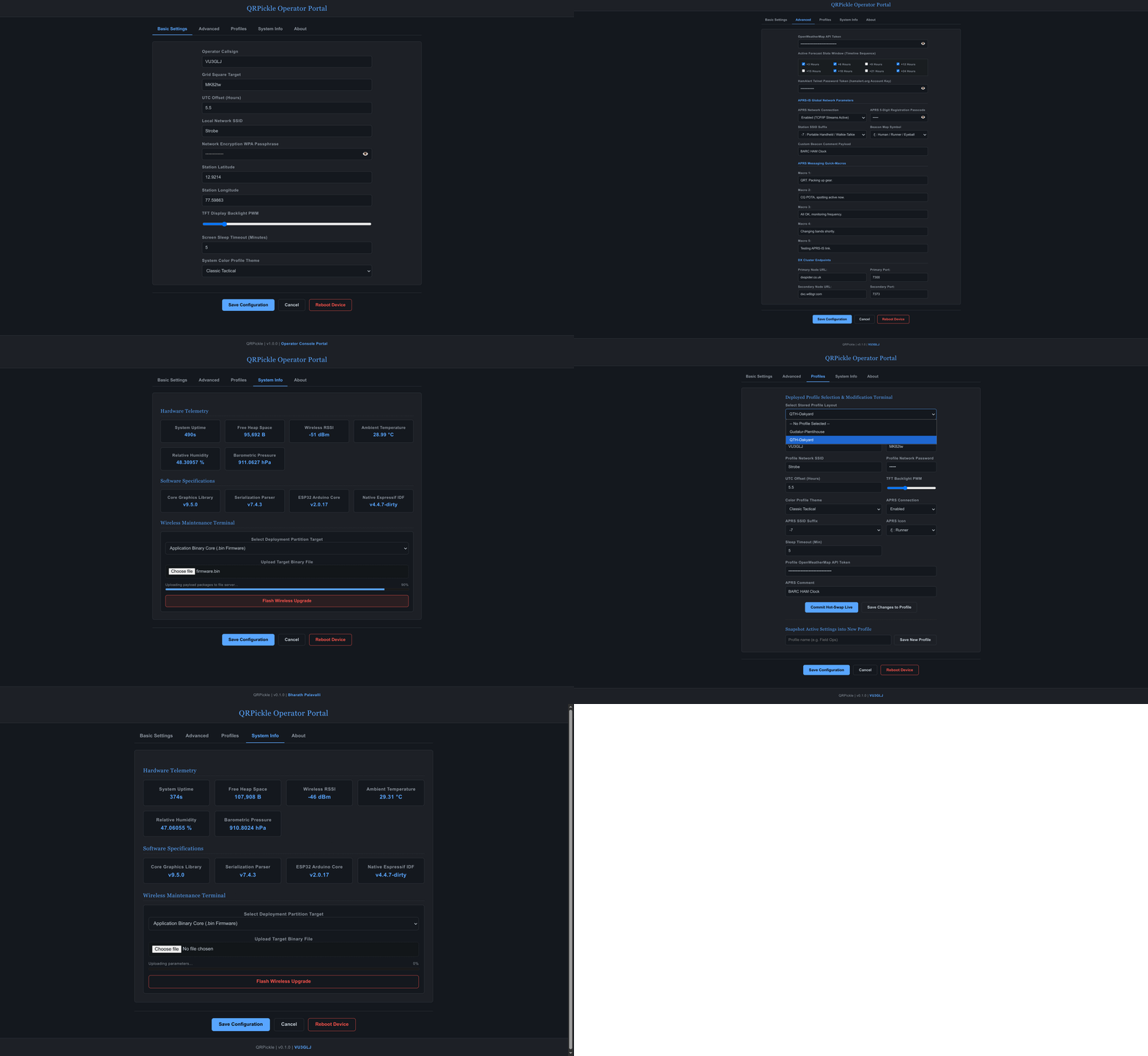
Figure 2: QRPickle Web Dashboard
Let us not worry about logging for now! ↩︎
The EOL of HamClock from Clear Sky Institute developed by WB0OW (SK now), led to a slew of projects ranging from https://hamclock.com/, https://ohb.works/ with source at https://github.com/openhamclock, and https://github.com/accius/openhamclock. ↩︎
Despite my long standing ethical issues with LLMs, this was a quicker turn-around, and smoother turnaround given my needs. ↩︎